
Trading Nut Solo
5 Futures Prop Firm Mistakes That Blew My Accounts (And How to Avoid Them)
Watch
If you have ever traded a futures prop firm challenge, you know how easy it is to watch a funded account vanish overnight. In this solo episode, I am sharing the five painful mistakes I made early in my futures trading journey so you do not have to repeat them. We will also break down the mechanics of the brand-new FTMO Futures Pro plan to see how its drawdown rules and platform integrations stack up against other industry offerings.
Mistake #1: The “Ghost” Order That Blows Accounts in Your Sleep
One of the most painful lessons I ever learned occurred after what I thought was a highly successful trading day. I was up 2R on my final position, moved my stop loss into profit, and eventually got stopped out. Believing I was safely flat for the day, I went to bed [01:18].
When I woke up the next morning, the account was completely gone.
Because futures platforms do not always bind stop-loss and take-profit orders together as a single OCO (One-Cancels-the-Other) bracket, my take-profit order remained active on the exchange. The market reversed overnight, filled that orphan order, and ran it straight into maximum drawdown. To prevent this, you must check your platform’s order book at the end of every session to ensure you are 100% flat with zero working orders.
Mistake #2: Forgetting to Scale Your Bracket Orders on Partials
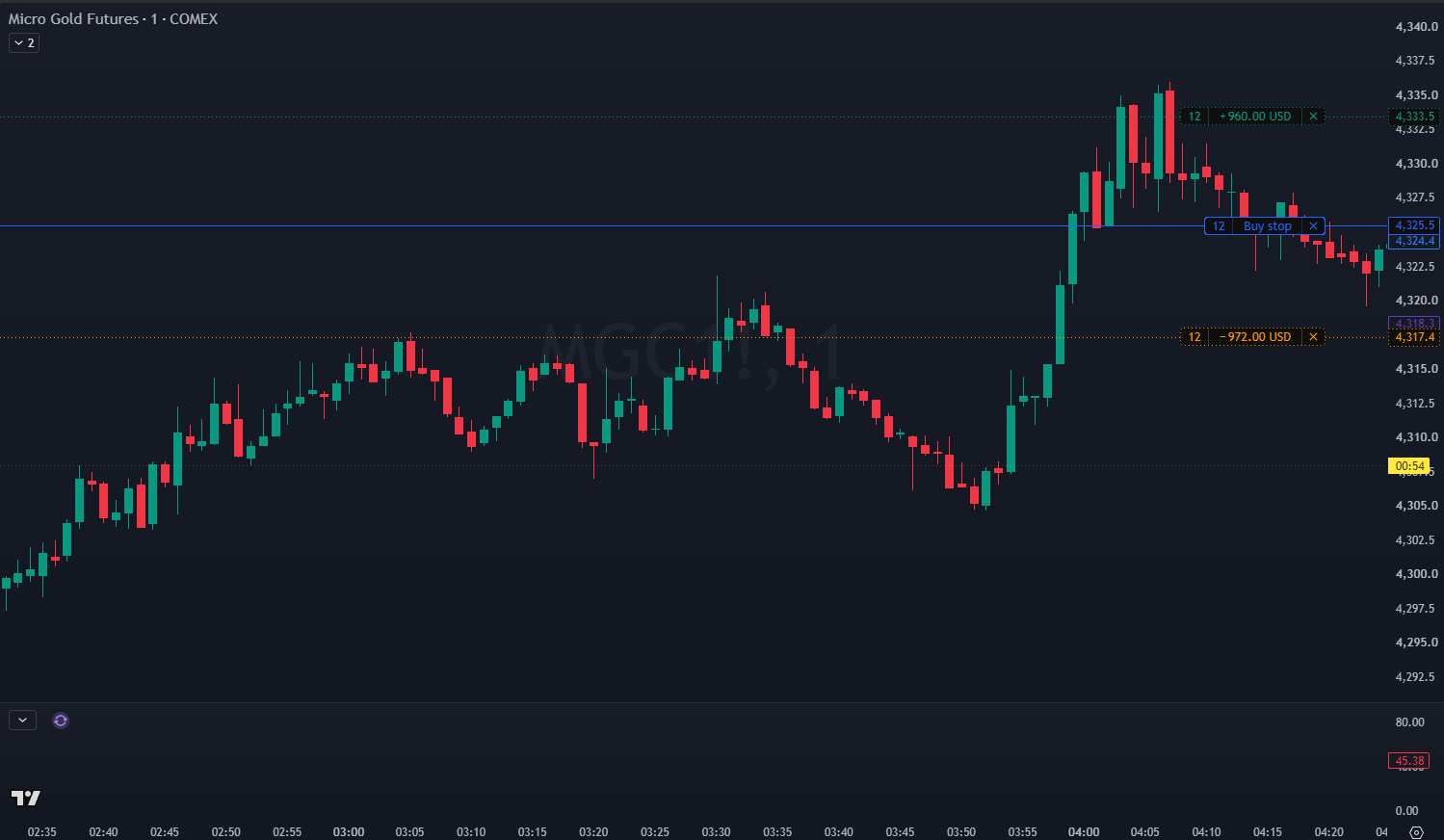
If you enter a trade with 10 contracts and decide to scale out of 5 contracts as a partial profit, your bracket orders do not automatically adjust [02:50]. If you do not manually reduce your stop-loss and take-profit orders to 5 contracts each, you are leaving yourself exposed.
If the market hits your original 10-contract stop loss, you will not only close your active 5-contract position but also open a brand-new 5-contract position in the opposite direction. Always double-check and balance your brackets when scaling.
Mistake #3: Paying Hidden Fees for TradingView Integration
Many traders do not realize that several futures prop firms charge additional monthly data or platform fees just to use TradingView [03:56]. Over time, these recurring costs eat into your trading capital. Look for firms like FTMO that bundle TradingView, NinjaTrader, and TraderVay access directly into their challenge fees without hidden surcharges.
Mistake #4: Trading the Wrong Front-Month Contract
Unlike equities or spot forex, futures contracts expire and roll over constantly [04:41]. If you accidentally trade an illiquid, expiring contract, you will experience massive slippage and erratic price action.
If you are unsure which contract is currently active, pull up the 1-minute chart for the asset and compare the trading volume. FTMO simplifies this by allowing you to trade auto-revolving contracts that roll over automatically without chart manual updates.
Mistake #5: Oversizing with Full Contracts Instead of Micros
When starting out, many traders jump straight into full contracts without realizing how fast the tick value can destroy an evaluation account [06:10]. Full contracts also limit your scaling options. If you only trade 1 or 2 full contracts, you cannot take precise partial profits. By trading 10 to 15 micro contracts instead, you can scale off small portions of your position at key targets while letting the rest run risk-free.
Bonus Mistake: The Accidental TradingView “Reverse” Button
TradingView has a default “Reverse Position” button located directly on your active position line [08:57]. If you accidentally click this while trying to adjust your stop loss or close a trade, it will instantly flip your position size in the opposite direction. Go into your TradingView chart settings, navigate to the trading tab, and disable “Reverse Position” to remove this hazard from your screen entirely.
Key Lessons
- [01:18] Always verify your order book is completely flat at the end of the day to avoid 'ghost' take-profit orders blowing your account.
- [02:50] When taking partial profits, manually update both your remaining take-profit and stop-loss brackets to match your new position size.
- [03:56] Avoid prop firms that charge extra monthly fees for TradingView integration; choose platforms that include it.
- [04:41] Watch out for futures contract rollovers. Trade the front-month active contract or use auto-revolving contracts.
- [06:10] Utilize micros and minis instead of full contracts to allow for fine-tuned scaling and partial take-profits.
- [08:57] Disable the 'Reverse Position' button in your TradingView settings to prevent accidental catastrophic trades.
345. Trading Nut
 Ty Feutz29 mins
344. Trading Nut
 Joseph Pena
343. Trading Nut
 Dave Mabe
DTC 33
 Cam, JJ & Vatsal26 mins
342. Trading Nut
 Vinnie Strothers
341. Trading Nut
 Sir Hans Felix